Monday, February 6, 2017


Wednesday, January 22, 2014
More showing and less telling ... digital portfolios for students
.JPG)
Recently I read this a good article on this subject titled "Your Digital Portfolio" and I think it speaks volumes about why many students after graduation struggle to land jobs in their career fields of interest.
I have used Google Sites for this portfolio work in the past but this semester I decided to tryout About.me instead. I think the simple electronic business card platform will intrigue my students more than Google sites and prove very effective for cataloging their work electronically through linking.
As always, I appreciate the feedback and enjoy hearing back from both students, educators, parents, and employers who have experience with digital portfolios.
Thursday, November 7, 2013
Do you need Adobe Photoshop or is Pixlr (www.pixlr.com ) sufficient for most of us?
.JPG) |
| student using pixlr to edit photos |
Last year in my Digital Media class at Truckee High School I was teaching on PCs that had Adobe Photoshop installed on them. We used it for many of our lessons and students created a lot of great work with it. This year, I was lucky to have my classroom upgraded with new Apple iMacs. These computers are a big improvement from my older Dells but they did not come with Photoshop installed on them. I'm looking into purchasing licenses for this software but in the meantime have found that Pixlr online editing software has allowed my students to complete all of my introductory editing lessons teaching them basic photo editing, effects, and layering. I have not used Pixlr long enough however to determine where I will reach a road block.
Please comment below with your thoughts regarding Pixlr and it's capabilities in regards to Adobe Photoshop. From my experience so far, I do think that I can confidently state that most people could do most of what they did on Photoshop with Pixlr and of course the best part is that Pixlr's software is free and even better, requires no account or login!
The picture above is of a student in my digital media class using Pixlr Editor to add filters and adjustments to her digital photographs. The kids have a lot of fun with this lesson as it really provides them an outlet for their creativity which they can then share with others on Flickr or Google+ Photos.
Thursday, October 24, 2013
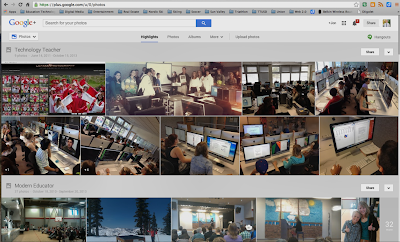
Google+ Photos -- A Better Way to Store, Edit, & Share Images?
Share memories with just the right people - Google+:
 I use to use Picasa to edit photos but now you can access many of the same basic editing features right in Google + by accessing your Photo page.
One new feature of this service is similar to Apple's iCloud feature where you can set your phone to automatically backup all your pictures to your Google + Photo account. This makes it easy to access your pictures taken on your phone from any internet connected device where you can then edit them, organize, and share them with friends, family, or the public. One important thing to point out with this feature is the fact that you may quickly reach your storage limit at Google and be faced with the decision to upgrade your account by paying a monthly fee. Click here to learn about Google storage limits and pricing. More information about this can be found here.
Another interesting new feature of Google+ Photos I have not messed around with yet is 'Auto Awesome'. This feature is on by default and does all kinds of things for you like improving your photos, stitching together multiple photos into a panoramic shot, creating animations out of series of photos, improve everyone's 'smile' in a group shot by selecting the best shot of each person from multiple shots to create one awesome shot, and HDR where multiple exposures of the same shot are stitched together to create one high quality image. Learn more about this feature here.
Finally, as with so many other online photo editing programs, Google+ Photo lets you auto enhance or customize your pictures at the click of a button. It also includes many cool features like adding effects and borders. I highly recommend giving this service a try for your photo management. I can not say that it is better than other services but I do know from first-hand experience that it is important to streamline the services I use so that I am as efficient as possible with my work. Since I use Google for so many other things; email, storage, collaboration, video conferencing, and web site creation to name a few, it seems like a good way to go for me and others who do the same since Google+ Photos are directly connected to the other host of Google applications and services. This makes it easy to embed a slideshow in another application or share an album with colleagues and clients.
If you find you like this service and want to get more advanced editing and management features, then try downloading Picasa to your computer hard drive. Once you do this you can access a full range of photo editing and management features and it connects directly with your Google+ Photo account.
Download Google Picasa 3.9 here!
 STUDENT REFLECTION ASSIGNMENT:
For my students at Truckee High School. Please comment below and reflect on how you could use this Google service for your academic work. Think about all of your class learning projects and brainstorm ways that you could use Google+ Photos for your work. Include ideas around sharing photos and incorporating them into other projects using various Google applications or other software applications. Your reflection should be at least 2 paragraphs in length and include at least three examples of possible application in your academic work.
'via Blog this'

One new feature of this service is similar to Apple's iCloud feature where you can set your phone to automatically backup all your pictures to your Google + Photo account. This makes it easy to access your pictures taken on your phone from any internet connected device where you can then edit them, organize, and share them with friends, family, or the public. One important thing to point out with this feature is the fact that you may quickly reach your storage limit at Google and be faced with the decision to upgrade your account by paying a monthly fee. Click here to learn about Google storage limits and pricing. More information about this can be found here.
Another interesting new feature of Google+ Photos I have not messed around with yet is 'Auto Awesome'. This feature is on by default and does all kinds of things for you like improving your photos, stitching together multiple photos into a panoramic shot, creating animations out of series of photos, improve everyone's 'smile' in a group shot by selecting the best shot of each person from multiple shots to create one awesome shot, and HDR where multiple exposures of the same shot are stitched together to create one high quality image. Learn more about this feature here.
Finally, as with so many other online photo editing programs, Google+ Photo lets you auto enhance or customize your pictures at the click of a button. It also includes many cool features like adding effects and borders. I highly recommend giving this service a try for your photo management. I can not say that it is better than other services but I do know from first-hand experience that it is important to streamline the services I use so that I am as efficient as possible with my work. Since I use Google for so many other things; email, storage, collaboration, video conferencing, and web site creation to name a few, it seems like a good way to go for me and others who do the same since Google+ Photos are directly connected to the other host of Google applications and services. This makes it easy to embed a slideshow in another application or share an album with colleagues and clients.
If you find you like this service and want to get more advanced editing and management features, then try downloading Picasa to your computer hard drive. Once you do this you can access a full range of photo editing and management features and it connects directly with your Google+ Photo account.
Download Google Picasa 3.9 here!
 STUDENT REFLECTION ASSIGNMENT:
For my students at Truckee High School. Please comment below and reflect on how you could use this Google service for your academic work. Think about all of your class learning projects and brainstorm ways that you could use Google+ Photos for your work. Include ideas around sharing photos and incorporating them into other projects using various Google applications or other software applications. Your reflection should be at least 2 paragraphs in length and include at least three examples of possible application in your academic work.
'via Blog this'
Tuesday, October 15, 2013
Google Spreadsheet Assessment
 Today I'm giving my first Google Spreadsheet assessment. Students received a Google Document with directions and questions to complete. There is also a set of data that they have to produce a data table with on a new Google Spreadsheet and perform various calculations. They will also produce two charts to display their results.
 Unfortunately, I do not think this assessment will save me any grading time versus my previous assessment using MS Excel when students sent me an email with two attached files since I will still have to open up two Google shared files to grade each students work. I think next time I need to explore putting the questions into a Google Form. However, that eliminates other skill assessments from the test like opening shared files, making editable copies, and sharing documents. Let me know if you have any ideas on how to best assess this type of student learning with Google so that it provides a valuable learning experience and is efficient as possible for the instructor providing student feedback.
Tuesday, October 1, 2013
Google Spreadsheets - Goodbye MS Excel

I'm really hoping this transition goes well since these lessons are so valuable for their employable future! Next to being able to type better my class alumni who stay in touch say 'excel' skills are the most important thing they learned in my class.
Wednesday, September 25, 2013
Google Class - Back to School Night Presentation
Following is a Google Presentation I put together for Back-to-School Night to inform parents about what their students are learning and experiencing in Google class. Please let me know if you have any comments or questions. I am always looking for guest speakers so if you have experienced using Google products in your own line of work, please consider sharing with my classes.
Thank you,
Jon Halvorsen
Thank you,
Jon Halvorsen
Friday, September 20, 2013
QuickOffice is Now Free!

https://play.google.com/store/apps/details?id=com.quickoffice.android
Thursday, September 19, 2013
AirServer in the Classroom
 I may have just discovered one of the coolest pieces of technology for use with my students in the classroom in a long time. Ed Hilton, our district technology coach stopped by my classroom yesterday and showed me how to use AirPlay on my iPhone to mirror my phone with my classroom desktop iMac using AirServer. Now I can move about my classroom freely displaying my iPhone screen to my students since my desktop computer is projected for student viewing on a large screen TV. Using my remote control LanSchool software I can also display my iPhone onto the screens of all 34 of my student computers. This is awesome since many of my lessons involve the use of Google Drive applications which I can run on my iPhone using the Google Drive App. Plus, students think this is really cool since I can also stream music from my phone through my desktop speaker system and control the volume using my phone controls. Kind of fun playing around with SIRI to as you move about the class when you need information quickly.
Check it out or stop by my classroom to brainstorm how you could use it in your classroom.

Tuesday, September 17, 2013
Student Blogs
Today students are setting up blogs in my Google class on topics of interest. It is my hope that this interactive platform will excite their interest in writing and reading since it will allow for sharing and connecting with others who share the same interests.
 Are you an educator who has used blogging with students? Please share your own experiences with this or problems and concerns you have had to deal with.

Monday, September 16, 2013
Have You Purchased a Used Smartphone?

Recently Apple has introduced its new iPhone 5 C line and the S model includes a fingerprint security system. Experts say this is a step in the right direction towards protecting people from thieves who steal phones for resale on the black-market. Read and listen to this story by NPR about the cell phone black-market problem. However, what happens if it does not work perfectly and you can not get access to your phone? Just thinking out-loud.
Have you had a phone stolen? Have you purchased a used phone online? Please share your experiences with this topic and what you have done to protect your own phone and/or to make sure what you purchased used was not stolen property.
Friday, September 13, 2013
Blogs Provide a Place for Students to Connect and Share

Once students see the possibilities around sharing their ideas and having discussions with other people interested in similar topics they not only write, but become excited about the power of the written word and the way blogging allows them to connect with others and become part of an ongoing conversation around their interests. Blogs also make writing more exciting since students can include embedded images and videos and share links to other authors writing about similar topics.
One excellent blog example I use to gain my students curiosity with this tool is http://unofficialnetworks.com/

This blog is all about skiing and the life that surrounds it and since I teach in a ski town where most of my students have season passes(several alums even ski for the US Ski Team) to one of the mountains this blog features; it is a natural lead in. The kids eat up the content since they relate to it and share a passion for the sport and lifestyle. They also quickly see how it keeps them informed about local events, people, and industry trends which only makes them more excited about the ski season.
So, check out the link below to learn more about getting your students blogging and see how you can use these tools to increase your student's literacy and communication skills. No matter the subject we teach; it is all educators responsibility to help our kids be better readers and writers.
- https://support.google.com/blogger/?hl=en#topic=3339243 -- Google's free blog hosting service
- http://edublogs.org/curriculum-corner-using-a-blog-with-students/ -- Using blogs with students
If you have some great ideas about using blogging with your students please share by commenting on this post. One issue I know always makes some teachers hesitate to incorporate blogging in their curriculum is online safety. There are lots of wonderful resources online about teaching students how to use blogging and the internet responsibly and safely but please share how you address this topic in your class since we can all learn from each other. I know I always feel better doing something that I know others are doing as well versus be a 'lone ranger'.
Monday, February 11, 2013
Post office to cut Saturday delivery starting in August | SierraSun.com
I have to say that it has surprised me that these kind of cuts in our United States Postal Service have not occurred earlier. As a high school teacher I found that many of my students can not remember the last time they sent a piece of mail that required paper, an envelope, and a stamp. In fact, some have joked, "what is a stamp?"
As the Internet continues to change the way we communicate and obviously has resulted in less mail being sent via snail-mail as email and other forms of electronic communication use increase like social media; possibly the postal service will find solace in the fact that package deliveries have increased due to online shopping. Just another example of how organizations have to evolve with the times in order to stay successful.
So, when is the last time you wrote a letter on paper, put it in an envelope, affixed a first-class stamp to it, and placed it in a mailbox? Please comment below and share and explain where you see the future of communication going.
ARTICLE:
Post office to cut Saturday delivery starting in August | SierraSun.com:
'via Blog this'
As the Internet continues to change the way we communicate and obviously has resulted in less mail being sent via snail-mail as email and other forms of electronic communication use increase like social media; possibly the postal service will find solace in the fact that package deliveries have increased due to online shopping. Just another example of how organizations have to evolve with the times in order to stay successful.
So, when is the last time you wrote a letter on paper, put it in an envelope, affixed a first-class stamp to it, and placed it in a mailbox? Please comment below and share and explain where you see the future of communication going.
ARTICLE:
Post office to cut Saturday delivery starting in August | SierraSun.com:
'via Blog this'
Friday, September 14, 2012
iPhone 5 - Are You Upgrading?
Apple - iPhone 5 - The thinnest, lightest, fastest iPhone ever.:

Really like the new iSight Camera with panoramic picture capabilities and the A6 processor chip. LTE wireless is something I need to learn more about too since Apple claims that it will provide for download speeds faster than most typical wireless connections.
Another cool feature is that now people can Facetime call over their wireless connection without hacking their phone since a wireless connection is no longer required.
What does everyone think; will you upgrade soon if you already have the iPhone 4S?
More news and reviews are available here http://www.techradar.com/news/phone-and-communications/mobile-phones/new-iphone-5-release-date-news-and-rumours-721534
Video Comparison of the iPhone 4 vs. iPhone 5
Thursday, September 13, 2012
Friends, Likes, Share, +1, Embed, Comments, & Now Pins

What social media tools are the best, important, or worth our time? I don't claim to have the answer to this dilemma but for now; I'm doing everything I can to stay up to date with most all of them since I teach digital media and computer classes to high school students who are using these services regularly for daily communication and interaction. They also use them to get their news or information so if you aren't connected in these ways, communicating with them effectively might be difficult. In case you did not know, teenagers consider email and web sites old-hat. If the local newspaper, in our case the Sierra Sun, wants the younger generation to read their paper, they better Tweet or Facebook it. Moving from print to a web site no longer makes an organization modern or tech savvy.
I just recently was 'invited' to Pinterest and signed up for my account. Now I am asking students who already have been 'pinning' media for sometime now, how exactly I should be using this new social media tool. If you have some good advice, please share below by commenting.
When should I Tweet it, Facebook it, Pin it, blog it, Google +1 it, or just add it to my flickr or Picasa albums? Please HELP!
My new Pinterest page is http://pinterest.com/truckeeteacher/
Thanks
Wolverine Pride: Nevada Twilight Meet: Running at Night!
Students in my new Digital Journalism class are starting to publish their first article posts to our high school blog, the 'Wolverine Pride'.
Wolverine Pride: Nevada Twilight Meet: Running at NigPublish Postht!
Wolverine Pride: Nevada Twilight Meet: Running at NigPublish Postht!
Friday, September 7, 2012
President Obama's Speech & Vision for Four More Years
Last night our President delivered a speech at the National Democratic Convention. In it, he outlined his vision for our country and what his plan is for the next four years if he is to be reelected.
Watch the speech and please comment below with your thoughts regarding his speech and vision. What should democracy look like? How can we be great citizens of this nation?
Wednesday, September 5, 2012
Safety Tips for Blogging
 It is always fun starting a new class and getting my students fired up to WRITE by turning them into bloggers. However, this excitement is also counterbalanced with fear since it is a big responsibility as an educator to make sure students blog safely and create media that is positive and beneficial to their lives. What should they write about? What pictures are OK to share? Can they or should they upload video that contains footage of other students? Do they need permission forms signed by other students and their parents that they feature in one of their posts?
These are many of the questions that I ask each time I start teaching a new group of students to be citizen journalists by blogging. Unfortunately, the answers to these questions are never black and white but there are some great resources available for students, parents, and teachers to access to help navigate this new writing medium. Hopefully, as long as some simple rules of safety are followed student bloggers will have a positive experience sharing their news with others and add another asset to their digital portfolios that will go with them throughout life.
Here is one online resource with some basic safety rules for young bloggers.
http://www.microsoft.com/security/family-safety/blogging.aspx
Thursday, August 30, 2012
Impressive Student Digital Journalism Web Site: Silver Chips Online
I'm fortunate in that I get to teach a new course here at Truckee High School titled 'Digital Journalism'. It is pretty amazing to see the quality of student journalism going on today by students across the country and available online. Check out this high school journalistic news site, it is crazy good!
Silver Chips Online: ( http://silverchips.mbhs.edu/
'via Blog this'
Silver Chips Online: ( http://silverchips.mbhs.edu/
'via Blog this'
Thursday, June 7, 2012
Why Twitter and Facebook Are Not Good Instructional Tools
Why Twitter and Facebook Are Not Good Instructional Tools
As educators, we must find a balance between screen time and “face” time.
As educators, we must find a balance between screen time and “face” time.
Subscribe to:
Posts (Atom)